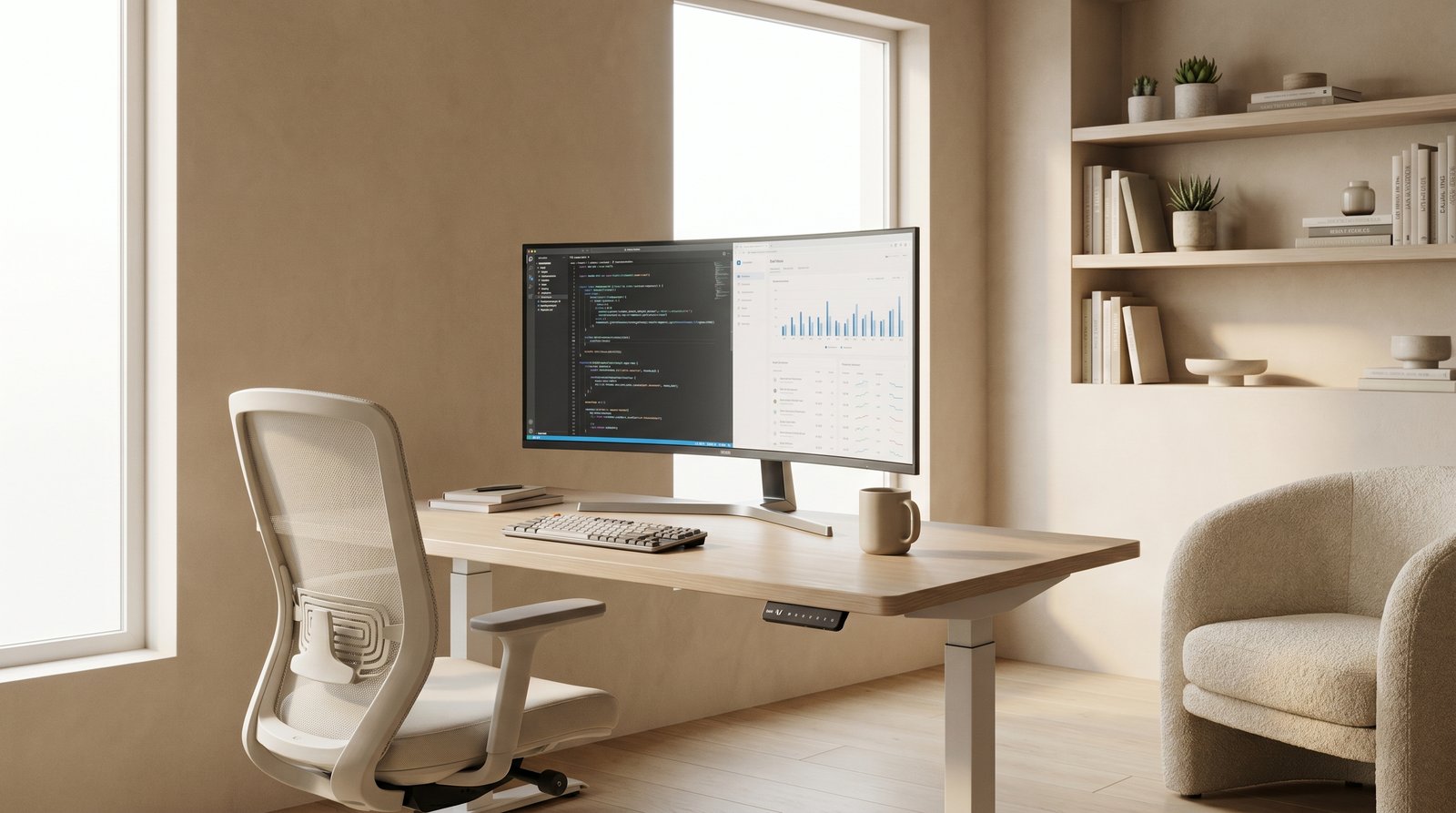
In today's dynamic work landscape, the concept of the home office has evolved from a luxury to a necessity for many. As more professionals embrace remote work, the quality of your workspace directly impacts your productivity, creativity, and overall well-being. A thoughtfully executed home office design isn't just about aesthetics; it's about creating an environment that supports focus, minimizes distractions, and promotes a healthy work-life balance. Whether you're carving out a dedicated room or transforming a corner of your living space, designing a productive work from home setup is an investment in your professional success and personal comfort.
At ryy.com, we understand the challenges and opportunities that come with designing your ideal workspace. Our AI-powered tools can help you visualize, plan, and execute your dream home office, allowing you to experiment with layouts, furniture, and decor before making any commitments. Let's dive into the essential elements of creating a home office that doesn't just look good, but actively helps you thrive.
Ergonomics & Comfort: The Foundation of a Productive Workspace
Productivity starts with physical comfort. An ergonomic setup prevents strain, reduces fatigue, and allows you to maintain focus for longer periods. Ignoring ergonomics can lead to discomfort, pain, and a significant dip in your work efficiency.
Choosing the Right Desk
Your desk is the command center of your home office. Consider its size, height, and surface area. A desk that's too small can feel cramped and disorganized, while one that's too large might overwhelm your space. Adjustable standing desks have become incredibly popular, offering the flexibility to switch between sitting and standing, which is beneficial for circulation and energy levels. If a standing desk isn't an option, ensure your desk allows your arms to rest at a 90-degree angle when typing, with your feet flat on the floor or a footrest.
- Dimensions: Measure your space carefully. A desk that's at least 24-30 inches deep and 48-60 inches wide provides ample room for a monitor, keyboard, mouse, and other essentials without feeling crowded.
- Material & Style: Choose a material that suits your aesthetic and durability needs. Solid wood, laminate, and glass are popular options. Consider built-in storage if space is a concern.
- Placement: Position your desk to maximize natural light and minimize glare on your screen. Facing a window can be inspiring, but be mindful of direct sunlight at certain times of day.
The Importance of an Ergonomic Chair
This is arguably the most critical piece of furniture in your home office. An ergonomic chair provides proper lumbar support, adjustable height, armrests, and tilt mechanisms, all designed to support your natural posture and reduce stress on your spine. Investing in a high-quality ergonomic chair is investing in your long-term health and productivity.
- Adjustability: Look for chairs with adjustable seat height, backrest tilt, armrest height and width, and lumbar support.
- Material: Breathable mesh, fabric, or high-quality leather can impact comfort over long hours.
- Try Before You Buy (Virtually): Use ryy.com's AI design tools to see how different chair styles and sizes fit into your existing or planned home office layout. This can help you visualize proportions and aesthetics.
Lighting for Focus and Eye Health
Good lighting is crucial for preventing eye strain and maintaining alertness. A combination of natural and artificial light sources is ideal.
- Natural Light: Position your desk to take advantage of windows. Natural light boosts mood and energy. Use sheer blinds or curtains to diffuse harsh sunlight.
- Ambient Lighting: Overhead lighting should provide a general, even illumination without creating shadows.
- Task Lighting: A good desk lamp is essential. Choose one with adjustable brightness and color temperature (cooler tones for alertness, warmer for relaxation). Position it to avoid glare on your screen.
- Avoid Glare: Ensure no light source (window or lamp) is directly behind or in front of your screen, as this creates glare and strain.
Optimizing Your Home Office Layout for Workflow
The layout of your home office significantly impacts how you move, access materials, and process information. A well-organized layout streamlines your workflow and reduces mental clutter.
Defining Zones for Different Tasks
Even in a small space, you can create functional zones. Think about the different activities you perform: focused work, brainstorming, video calls, filing, or taking breaks.
- Focused Work Zone: Your desk area, free from distractions.
- Collaboration/Meeting Zone: If you frequently have video calls, consider a backdrop that is professional and uncluttered. A comfortable armchair or a small side table could serve as a secondary space.
- Storage & Filing Zone: Keep essential documents and supplies within easy reach, but organized.
- Relaxation Zone: Even a small plant, a comfortable pillow on a window seat, or a dedicated reading nook can help you reset during breaks.
Use ryy.com to experiment with different layouts for your specific room dimensions. Our AI can generate various options, helping you visualize how different furniture placements affect flow and functionality.
Smart Storage Solutions
Clutter is a productivity killer. Effective storage keeps your workspace tidy and your mind clear.
- Vertical Storage: Shelves, tall bookcases, and wall-mounted units make the most of vertical space, especially in smaller offices.
- Drawer Organizers: Keep pens, paper clips, and small items neatly separated within drawers.
- Filing Systems: Whether digital or physical, establish a clear system for important documents. Label everything clearly.
- Hidden Storage: Ottomans with storage, filing cabinets that double as side tables, or baskets on shelves can conceal unsightly items.
Harnessing Natural Light and Views
Connecting with the outside world can reduce stress and improve creativity. Position your desk to face a window if possible, but manage glare.
- Window Treatment: Sheer blinds or curtains can diffuse harsh light while still allowing natural illumination.
- Strategic Placement: If facing a window causes distractions, position your desk perpendicular to it, allowing you to glance out without being constantly pulled away.
- Bringing the Outside In: If a window view isn't possible, incorporate plants (biophilic design) and nature-inspired artwork to create a calming atmosphere.
Aesthetics & Ambiance: Designing for Inspiration
Your home office isn't just a functional space; it's also a reflection of your professional self. Thoughtful design choices can inspire creativity, reduce stress, and make you genuinely enjoy your workspace.
Color Psychology for Productivity
Colors have a profound impact on our mood and cognitive functions. Choose a palette that supports the kind of work you do.
- Greens & Blues: Calming, promote focus, and reduce anxiety. Ideal for demanding, detail-oriented work.
- Yellows: Stimulating and cheerful, great for creative fields, but too much can lead to anxiety. Use as accents.
- Grays & Neutrals: Provide a stable, elegant backdrop. Pair with pops of color to avoid a sterile feel.
- Warm Tones (Reds, Oranges): Energizing and passionate, but can be overstimulating. Best used sparingly or for roles requiring high energy.
Unsure which colors work best? ryy.com's AI can help you visualize different paint colors, accent walls, and furniture tones in your specific room, ensuring your chosen palette contributes positively to your productive workspace.
Personal Touches and Biophilic Design
Make your space uniquely yours, but maintain professionalism. Personal touches can boost morale and comfort.
- Art & Decor: Choose pieces that inspire you, but avoid excessive clutter. A minimalist approach often works best for focus.
- Plants: Incorporating greenery (biophilic design) has been shown to improve air quality, reduce stress, and increase productivity. Choose low-maintenance plants like snake plants, ZZ plants, or Pothos.
- Scent: A diffuser with essential oils like peppermint (for focus), lemon (for energy), or lavender (for calm) can enhance the ambiance.
Managing Clutter and Digital Detox
Physical and digital clutter can both be detrimental to productivity. Regularly decluttering is key.
- "One In, One Out" Rule: For every new item you bring into your office, consider removing an old one.
- Digital Organization: Keep your desktop clean, organize files into folders, and use cloud storage to reduce reliance on physical documents.
- End-of-Day Routine: Take 5-10 minutes at the end of each workday to tidy your desk, organize papers, and plan for the next day. This creates a fresh start.
Technology Integration for a Seamless Work From Home Setup
Your tech setup should be an enabler, not a source of frustration. Thoughtful integration ensures a smooth and efficient workflow.
Cable Management: The Unsung Hero
Tangled cables are not only unsightly but also a hazard and a source of distraction. Good cable management creates a cleaner, more professional look.
- Cable Ties & Sleeves: Bundle cables together.
- Cable Clips & Trays: Adhere cables to the underside of your desk or along walls.
- Wireless Peripherals: Opt for wireless keyboard, mouse, and headphones to reduce cable clutter.
Choosing the Right Tech Tools
Beyond your computer, consider additional tech that enhances your productivity without overwhelming your space.
- Monitor Setup: A second monitor can significantly boost productivity. Consider a monitor arm to save desk space and allow for ergonomic positioning.
- High-Quality Webcam & Microphone: Essential for clear communication during video calls.
- Reliable Wi-Fi: A strong, stable internet connection is non-negotiable for a smooth work from home setup. Consider a mesh Wi-Fi system if your coverage is inconsistent.
Acoustic Solutions for Quiet Focus
Noise distractions, whether from inside your home or outside, can severely impact concentration.
- Noise-Canceling Headphones: An immediate solution for blocking out noise.
- Rugs & Carpeting: Absorb sound, reducing echoes and ambient noise, especially on hard floors.
- Fabric Furniture: Upholstered chairs or acoustic panels can help dampen sound.
- Door Seals: If your office is in a separate room, sealing gaps around the door can reduce noise transmission.
Practical Tips for an Instantly More Productive Office
Ready to make some immediate improvements? Here are actionable tips to enhance your home office today:
- Declutter Daily: Spend 5 minutes at the end of each day clearing your desk.
- Add a Plant: Introduce some greenery for a natural mood boost.
- Optimize Lighting: Ensure you have good task lighting and minimize screen glare.
- Personalize Mindfully: Add one or two meaningful items that inspire you, but avoid clutter.
- Organize Cables: Use zip ties or cable sleeves to tidy up visible wires.
- Stretch Regularly: Take short breaks to stand up, stretch, and move around to prevent stiffness.
- Create a "Do Not Disturb" Signal: Communicate your work hours to family members to minimize interruptions.
- Clean Your Screen: A clean monitor reduces eye strain and makes text clearer.
- Keep Hydrated: Have a water bottle or mug within reach to encourage consistent hydration.
- Use ryy.com for Visualization: Before buying anything, upload photos of your space to ryy.com and virtually try out different desks, chairs, storage units, and color schemes. Our AI will show you how everything looks together, saving you time and money.
Conclusion: Design Your Way to Greater Productivity
A well-designed home office is more than just a place to work; it's a strategic tool for personal and professional growth. By focusing on ergonomics, an efficient layout, inspiring aesthetics, and seamless technology integration, you can create a productive workspace that not only supports your tasks but also enhances your well-being. Remember, your home office design should evolve with your needs, so don't be afraid to make adjustments as you discover what works best for you.
Ready to transform your workspace? Visit ryy.com today and leverage our free AI design tools to bring your ideal home office to life. Experiment with countless designs, furniture placements, and color palettes, and visualize your future productive workspace instantly. Start designing smarter, not harder!