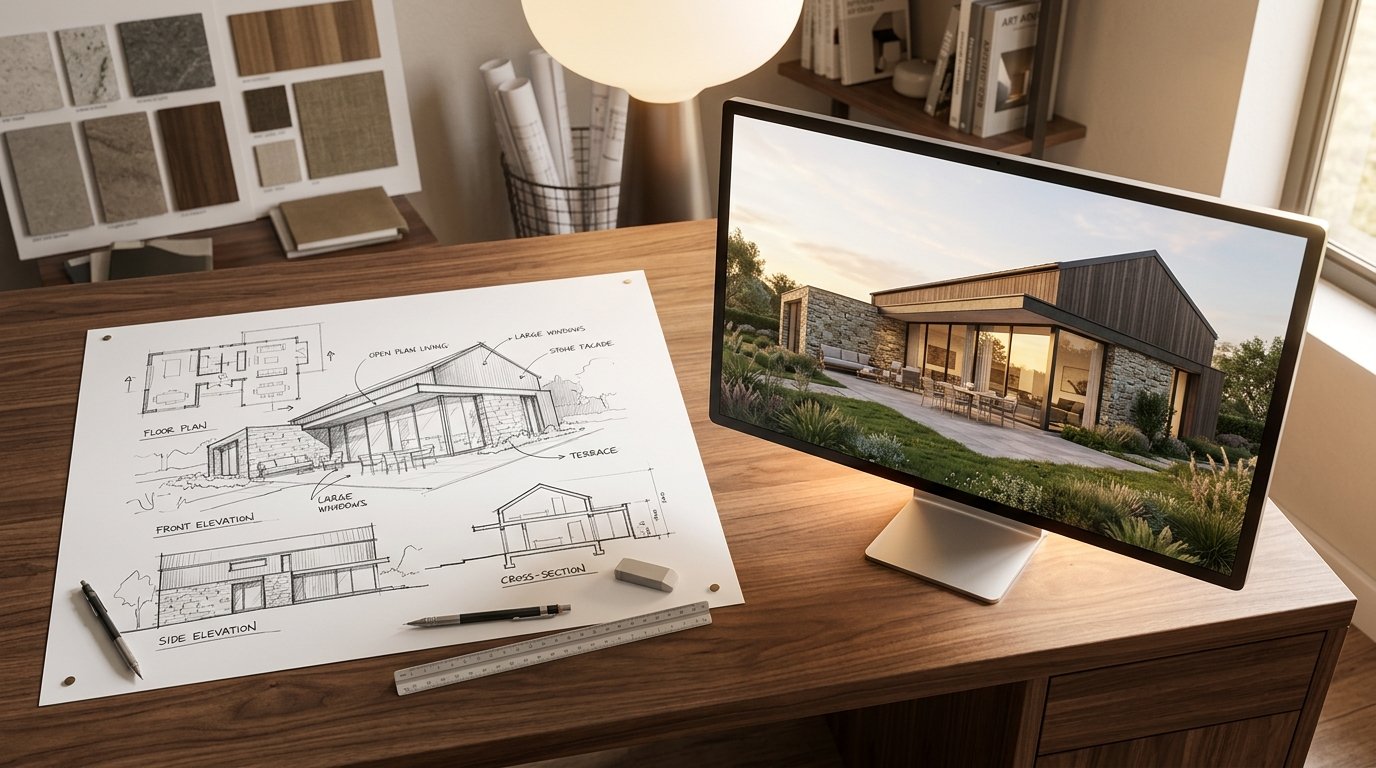
Imagine this: you've got a fantastic idea for a home renovation, a new build, or even just redecorating a room. You quickly sketch it out on paper – a rough layout, a few lines for walls, perhaps a window or a door. Now, picture that simple drawing instantly transforming into a photorealistic image, complete with textures, lighting, and a vibrant atmosphere. This isn't science fiction; it's the incredible power of AI architectural sketch render technology, and it's revolutionizing how we visualize and plan our spaces.
For decades, translating a sketch into a professional-grade rendering was a time-consuming and costly process, often requiring specialized software and expert human labor. Today, artificial intelligence has stepped in to bridge this gap, making high-quality visualization accessible to everyone from professional architects to enthusiastic homeowners. At ryy.com, we're at the forefront of this innovation, empowering you to see your design ideas come to life with just a few clicks.
The Traditional Roadblock: Why Visualization Matters
Before diving into the magic of AI, it's crucial to understand the challenges that traditional design visualization presented. Architects, interior designers, and homeowners alike have always struggled with the leap from concept to concrete image.
Bridging the Imagination Gap
One of the biggest hurdles in any design project is communication. A homeowner might describe their "airy living room" or "cozy kitchen" with enthusiasm, but conveying that vision precisely to a contractor, an architect, or even a spouse can be incredibly difficult. Sketches, while helpful, often lack the detail and realism needed to truly align expectations. Manual 3D renderings, while effective, are typically only produced much later in the design process due to their complexity.
This "imagination gap" often leads to misunderstandings, costly revisions, and ultimately, a finished product that doesn't quite match the initial dream. Being able to see a design clearly, before any physical work begins, is invaluable for making informed decisions and preventing expensive mistakes.
Time and Cost Constraints of Manual Rendering
Historically, achieving a photorealistic rendering involved a multi-step, labor-intensive process:
- CAD Drafting: Converting hand sketches into precise 2D computer-aided design (CAD) drawings.
- 3D Modeling: Building a detailed three-dimensional model from the 2D plans using specialized software. This is a complex skill in itself.
- Texturing and Material Application: Applying realistic textures for walls, flooring, furniture, and finishes – choosing colors, patterns, and material properties.
- Lighting Setup: Precisely placing virtual light sources, adjusting their intensity, color, and shadows to create atmosphere and highlight design elements.
- Rendering: The computer then calculates how light interacts with every surface in the scene, a process that can take hours or even days for a single high-resolution image, even on powerful machines.
- Post-Production: Further refinement in image editing software.
Each of these stages requires significant expertise, time, and expensive software licenses, translating into substantial professional fees. This made high-quality renderings a luxury often reserved for large-scale commercial projects or very high-end residential designs, largely inaccessible to the average homeowner.
The Need for Speed and Accessibility
The traditional rendering pipeline also severely limited iteration. If a client wanted to see how a different flooring material or wall color would look, the entire process, or at least a significant portion of it, would need to be repeated. This made experimentation slow and costly, discouraging designers and homeowners from exploring multiple options comprehensively. There was a clear need for a faster, more accessible, and more affordable way to visualize designs.
The Magic of AI Architectural Sketch Render: How It Works
Enter artificial intelligence. The advent of sophisticated machine learning models, particularly deep learning and generative adversarial networks (GANs), has completely transformed the rendering landscape. The core idea behind AI architectural sketch render is to teach a computer to understand the relationship between a simple line drawing and a detailed, photorealistic image.
Deep Learning and Generative Adversarial Networks (GANs)
At the heart of AI rendering are two powerful concepts:
- Deep Learning: This is a subfield of machine learning where neural networks with multiple layers (hence "deep") learn from vast amounts of data. In the context of rendering, an AI model is "trained" on massive datasets containing millions of pairs of architectural sketches and their corresponding photorealistic renderings. Over time, the AI learns intricate patterns, shapes, and relationships that allow it to infer a realistic image from a basic sketch.
- Generative Adversarial Networks (GANs): GANs are particularly effective for generating realistic images. They consist of two competing neural networks:
- Generator: This network takes your sketch as input and tries to generate a realistic image from it.
- Discriminator: This network acts like a critic. It's shown both real architectural renders (from the training data) and the images generated by the Generator. Its job is to distinguish between real and fake.
The two networks play a continuous game: the Generator tries to create images so realistic that the Discriminator can't tell them apart from real ones, and the Discriminator gets better at spotting fakes. This adversarial process drives the Generator to produce increasingly convincing and high-quality renders from even the simplest sketches.
From Lines to Photorealism: The Transformation Process
When you use an AI architectural sketch render tool like the one on ryy.com, here's a simplified look at what happens:
- Sketch Input: You start by uploading a hand-drawn sketch, a rough blueprint, or even drawing directly within the platform. The AI doesn't need perfect lines; it's designed to interpret even imperfect human input.
- Contextual Understanding: The AI's trained models analyze your sketch. It identifies key architectural elements – where walls are, the placement of windows and doors, the outline of furniture, and even the implied perspective. It understands the "intent" behind your lines.
- Material and Texture Application: Based on the learned patterns, and often with some input from you (e.g., specifying "wood floor" or "brick exterior"), the AI applies realistic textures and materials. It understands how light interacts with these materials, giving them depth and authenticity.
- Lighting and Shadow Generation: This is where much of the realism comes from. The AI automatically generates appropriate lighting, simulating natural light sources, artificial fixtures, and the complex interplay of shadows, enhancing the sense of depth and atmosphere.
- Style Transfer and Refinement: Many AI rendering tools allow you to choose a specific style – perhaps "modern minimalist," "rustic farmhouse," or "industrial chic." The AI then adapts the generated render to match that aesthetic, applying relevant color palettes, finishes, and contextual details.
User-Friendly Interface: No Expertise Needed
The true genius of these AI platforms, especially for homeowners, is that they abstract away all the underlying technological complexity. You don't need to understand deep learning or GANs. You don't need to know how to use complex 3D modeling software. All you need is your sketch and your vision.
Ready to try it yourself? Head over to ryy.com's free AI design tools and experience how effortlessly a basic drawing can become a vibrant, photorealistic render!
Unleashing Design Potential: Benefits for Homeowners and Professionals
The implications of AI architectural sketch render technology are vast, offering unprecedented benefits to anyone involved in design, from casual enthusiasts to seasoned professionals.
Visualize Your Dream Home Instantly
For homeowners, this is a game-changer. No more struggling to explain your vision or relying solely on abstract floor plans. You can quickly see what your new kitchen layout will look like, how that extension will impact your garden, or how a different paint color will transform your living room. This clarity builds confidence in your design choices, ensuring the final result truly reflects your desires.
Rapid Iteration and Experimentation
Gone are the days of costly revisions and slow turnaround times. With AI rendering, you can generate multiple design options in minutes. Want to see how wood flooring looks compared to tiles? Or a different window style? Simply adjust your input or AI parameters, and a new render is at your fingertips. This allows for unparalleled experimentation, leading to more refined and optimal designs. Explore endless possibilities for your space with ryy.com's iterative design tools.
Enhanced Communication and Collaboration
AI renders serve as a universal language for design. Instead of lengthy discussions or relying on imagination, you can present a clear, realistic image to contractors, family members, or interior designers. This visual aid reduces misinterpretations, speeds up decision-making, and fosters more effective collaboration, ensuring everyone is on the same page from the outset.
Cost and Time Savings
By automating the rendering process, AI significantly cuts down on both time and financial investment. Homeowners can avoid expensive professional rendering fees, while designers can free up valuable time previously spent on manual rendering, allowing them to focus more on creative design work. The ability to catch potential design flaws or aesthetic disagreements early through realistic renders also prevents costly changes during construction.
Democratizing High-Quality Design
Perhaps one of the most significant impacts of AI rendering is its ability to democratize design. High-quality visualizations are no longer exclusive to those with deep pockets or specialized training. Anyone with an idea and a simple sketch can now access tools that previously required professional expertise, opening up a world of design possibilities to a much broader audience.
Practical Applications and Getting Started with AI Rendering
The applications for AI architectural sketch render technology are incredibly diverse, touching almost every aspect of home design and improvement.
Interior Design Layouts
Whether you're planning a full interior overhaul or just rearranging furniture, AI can help you visualize the flow, furniture placement, color schemes, and material choices within your rooms. See how different sofa configurations impact traffic patterns or how a darker wall color changes the room's mood.
Exterior Facade Planning
Designing a new home exterior or renovating an existing one? AI can transform your facade sketches into realistic representations, allowing you to experiment with different cladding materials (brick, stucco, wood), window styles, roofing options, and landscaping elements. This ensures your home's curb appeal matches your vision.
Landscape Design
Beyond the structure itself, AI can render your garden and outdoor spaces. Visualize how a new patio, swimming pool, water feature, or planting scheme will look in context with your home. Plan your dream backyard with unprecedented clarity.
Renovation Previews
Considering knocking down a wall, adding a new room, or changing the layout of an existing space? AI can generate "before and after" scenarios from your sketches, helping you understand the full impact of your renovation decisions before construction even begins.
Getting Started with ryy.com
We believe everyone should have access to powerful design tools. That's why ryy.com offers intuitive, free AI design tools to bring your sketches to life. Here's how easy it is:
- Visit ryy.com: Navigate to our AI design platform.
- Upload or Draw Your Sketch: You can upload an image of your hand-drawn sketch, a basic floor plan, or even use our built-in drawing tools to create your design directly.
- Provide Context (Optional): Add simple text prompts to guide the AI, such as "modern living room," "rustic kitchen," or "exterior with brick and large windows."
- Choose Your Style: Select from a range of aesthetic styles to apply to your render.
- Generate: With a click, watch as the AI transforms your simple lines into a stunning, photorealistic render in seconds!
- Iterate: Not quite perfect? Adjust your sketch, modify your prompts, or try a different style until you achieve your ideal visualization.
It's that simple to unleash your creativity and visualize your design dreams. Start designing with ryy.com today!
Practical Tips for Optimal AI Renders
While AI is incredibly powerful, a few simple tips can help you get the best results from your sketch-to-render process:
- Start with Clear, Even if Simple, Sketches: The AI is smart, but clearer lines and defined shapes will always yield more accurate initial results. Don't worry about artistic perfection, but aim for distinct architectural elements.
- Use Basic Shapes Correctly: Clearly draw rectangles for windows, squares for doors, and defined outlines for rooms. The AI interprets these basic geometric forms.
- Experiment with AI Styles: Don't be afraid to try different style prompts. A sketch that looks one way in a "minimalist" render might look completely different, yet equally stunning, in a "bohemian" style.
- Provide Context Through Prompts: A simple text description like "open concept kitchen with island" can guide the AI to generate more relevant details and layouts.
- Iterate and Refine: The beauty of AI is its speed. Generate multiple versions, tweak your sketch slightly, or adjust your textual prompts to fine-tune the output until it perfectly matches your vision.
Conclusion
The journey from a simple hand-drawn sketch to a photorealistic architectural rendering used to be a long, arduous, and expensive one. Thanks to advancements in artificial intelligence, particularly the powerful capabilities of AI architectural sketch render technology, this process has been democratized and made accessible to everyone. Homeowners can now visualize their dream spaces with unprecedented clarity, while designers can iterate faster and communicate more effectively than ever before.
At ryy.com, we are committed to putting these revolutionary tools directly into your hands. Whether you're planning a major renovation, designing a new home, or simply dreaming up a new interior layout, our free AI design tools empower you to explore, experiment, and bring your visions to life in stunning detail. Stop imagining and start seeing. Your next design project is just a sketch away from becoming a vivid reality.
Transform Your Sketches with AI on ryy.com – Get Started Free!