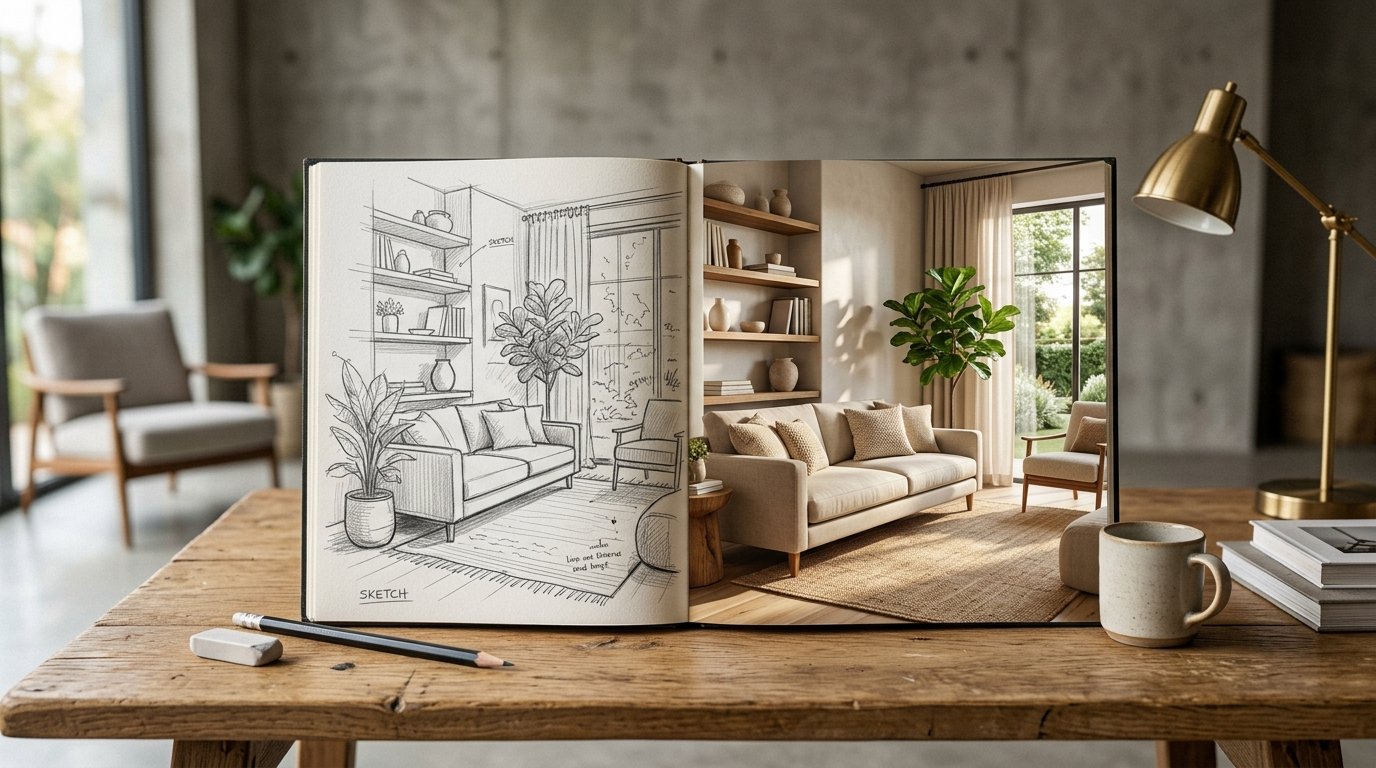
Imagine this: you have a brilliant interior design idea brewing in your mind. You grab a pencil and paper, quickly sketching out a rough outline of your dream living room, bedroom, or home office. In the past, transforming that raw vision into a realistic, tangible image would require hours of intricate 3D modeling, expensive software, or hiring a professional designer. But what if we told you that now, with the power of artificial intelligence, you can turn that simple pencil sketch AI room design into a stunning photorealistic rendering in mere seconds? Welcome to the future of interior design visualization, made accessible and free by ryy.com.
The days of struggling to explain your design concepts or spending countless hours trying to perfect a digital mock-up are over. Our innovative AI design platform empowers homeowners, interior design enthusiasts, and even seasoned professionals to bring their conceptual sketches to life with unparalleled speed and accuracy. Whether you're planning a full home renovation, simply redecorating a single room, or just exploring creative ideas, the ability to instantly visualize your sketches in various styles and finishes is a game-changer. Let's dive into how this incredible technology works and how you can start transforming your ideas today.
The Magic Behind Turning a Pencil Sketch into an AI Room
At its core, the transformation from a basic line drawing to a detailed photorealistic room relies on advanced artificial intelligence, specifically in the fields of computer vision and generative AI. It's a testament to how far technology has come, making complex processes incredibly user-friendly.
Bridging the Gap: From Concept to Reality
Traditional design processes often hit a bottleneck when moving from the ideation phase (sketches) to the visualization phase (renderings). This gap can lead to misunderstandings, costly revisions, and a longer project timeline. AI completely redefines this transition. It acts as an intelligent interpreter, understanding the intent behind your rudimentary lines and translating them into a rich, detailed visual representation. This means you can iterate on ideas much faster, exploring different layouts, furniture placements, and aesthetic choices without committing significant time or resources.
How AI Interprets Your Strokes
When you upload a pencil sketch to an AI design platform like ryy.com, the AI doesn't just overlay textures onto your lines. Instead, it employs sophisticated algorithms trained on vast datasets of interior spaces, furniture, and design styles. The AI "reads" your sketch, recognizing common elements like walls, windows, doors, and even the approximate placement of furniture. It then uses this understanding to construct a 3D-like representation, inferring depth, lighting, and spatial relationships that aren't explicitly drawn in your 2D sketch. Think of it as the AI filling in all the blanks with intelligent guesses based on everything it has learned about interior design.
The Technology at Play: Deep Learning and Image Synthesis
The specific technologies driving this magic are deep learning, a subset of machine learning, and advanced image synthesis. Deep neural networks, particularly generative adversarial networks (GANs) or diffusion models, are trained to generate new images from input data. In this case, your pencil sketch is the input. The AI learns the intricate patterns, textures, and lighting conditions associated with various interior design styles. When it receives your sketch, it generates an entirely new image that incorporates your layout while applying the chosen style's characteristics—from the type of flooring and wall color to the specific furniture designs and decorative elements. This results in a truly photorealistic output that respects your original sketch's structure.
Step-by-Step Guide: Your First Pencil Sketch AI Room Transformation
Turning your hand-drawn ideas into digital reality with ryy.com is incredibly straightforward. You don't need any special software or technical expertise. Here's how you can do it:
1. Sketch Your Vision
Start by drawing your room layout on a piece of paper. Don't worry about perfection or artistic skill; simple lines are often best for the AI. Include the basic structure: walls, windows, doors, and the general placement of major furniture items like a sofa, bed, or dining table. The clearer your primary structural lines, the better the AI can interpret your space.
2. Digitize Your Sketch
Once your sketch is complete, you'll need to get it onto your computer or smartphone. A simple photograph taken with your phone's camera under good lighting conditions is usually sufficient. Make sure the photo is clear, well-lit, and captures the entire sketch without shadows or distortions. You can also use a scanner if you have one for a crispier image.
3. Upload to ryy.com's AI Tool
Visit ryy.com and locate our free AI design tools. You'll find an intuitive interface designed for easy uploads. Simply drag and drop your digitized sketch file or click to select it from your device. Our platform supports common image formats like JPEG and PNG.
4. Choose Your Style and Generate!
After uploading, the fun begins! ryy.com offers a wide array of design styles—from minimalist and industrial to Scandinavian, bohemian, modern, classic, and more. Select the aesthetic you want your room to embody from the available options. You might also have options to specify room type (living room, bedroom, kitchen) or even material preferences. Once you've made your selections, hit the "Generate" button. In moments, our AI will process your sketch and present you with stunning photorealistic renderings.
5. Refine and Iterate
The beauty of AI is its speed and versatility. Not quite happy with the first result? No problem! You can easily generate multiple versions by trying different design styles, tweaking your initial sketch, or even applying various material palettes. This iterative process allows you to explore countless design possibilities rapidly, helping you hone in on the perfect look for your space.
Unleashing Creativity: What You Can Do with Your AI-Generated Rooms
The power of turning a pencil sketch AI room design into a photorealistic rendering goes far beyond just seeing your ideas. It opens up a new realm of creative exploration and practical application.
Experiment with Design Styles
Have you ever wondered what your living room would look like with a rustic farmhouse touch versus a sleek, modern aesthetic? With ryy.com, you can take the same basic sketch and apply different styles instantly. This allows you to visually compare and contrast various looks, helping you decide which aesthetic truly resonates with your taste before making any financial commitments.
Visualize Layouts and Furniture Placement
One of the biggest challenges in interior design is understanding how furniture will fit and function within a space. Our AI tool helps you visualize different furniture arrangements, assess traffic flow, and ensure all elements are scaled appropriately. You can quickly see if that oversized sectional really fits or if a smaller armchair would be a better choice, all without moving a single piece of real furniture.
Share and Collaborate with Ease
Sharing your design ideas with family, friends, contractors, or professional designers becomes effortless. Instead of trying to describe your vision or show a rough sketch, you can present a vivid, photorealistic image. This clarity improves communication, garners more precise feedback, and ensures everyone is on the same page, minimizing misunderstandings and costly errors.
Budget-Friendly Prototyping
For designers and homeowners alike, prototyping design ideas can be an expensive endeavor. AI rendering eliminates the need for physical mock-ups or expensive software licenses. You can experiment with different finishes, materials, and furniture types virtually, saving significant costs and time during the planning phase.
Practical Tips for Best Results with Your Pencil Sketch AI Room Designs
While ryy.com's AI is incredibly intelligent, a few simple tips can help you achieve even better results when transforming your pencil sketch AI room concepts.
Start with Clear, Simple Sketches
Less is often more when it comes to the initial sketch. Focus on clear, distinct lines for major structural elements like walls, windows, doors, and large furniture pieces. Avoid overly detailed shading or clutter, as this can sometimes confuse the AI. A neat, uncluttered sketch provides the AI with a strong foundation to build upon.
Pay Attention to Perspective and Scale
Even a rough sketch benefits from some attention to basic perspective. Try to give your room some depth, drawing walls receding into the distance. Also, try to draw furniture at a roughly proportionate scale to the room. While the AI is smart, giving it a good initial sense of depth and size will lead to more accurate and convincing photorealistic outputs.
Experiment with AI Styles
Don't just stick to one style. Generate multiple versions of your sketch using different AI-driven design aesthetics. You might be surprised by how a sketch you envisioned as modern looks fantastic with a touch of industrial chic, or how a classic style adds unexpected elegance. This experimentation is where the true power of AI design tools shines.
Leverage AI for Iteration, Not Just Initial Generation
Think of the AI as your design assistant. If you generate a design you like but want to change a specific element (e.g., the flooring color or a piece of decor), you can often do so within the platform's refinement options, or by slightly modifying your original sketch and re-generating. The AI is fantastic for quick iterations, allowing you to fine-tune your vision rapidly.
Don't Forget the Details (or lack thereof, initially)
While starting simple is key, remember that the AI can often infer details. If you draw a window, the AI will likely fill it with natural light and a realistic view. If you draw a general shape for a lamp, the AI will render a plausible lamp. You don't need to be an artist; just communicate the presence and approximate location of elements.
Conclusion: Your Design Journey Starts with a Sketch and AI
The journey from a fleeting idea to a fully realized design concept has never been easier or more accessible. The ability to take a simple pencil sketch AI room design and watch it transform into a vibrant, photorealistic rendering in seconds is a testament to the revolutionary potential of artificial intelligence in interior design. It democratizes design, putting professional-grade visualization tools into the hands of everyone, from aspiring designers to homeowners dreaming of their perfect space.
No longer do you need to be a CAD expert or spend a fortune on design software. With ryy.com, your creativity is the only limit. Our free AI design tools are designed to be intuitive, powerful, and incredibly fast, allowing you to explore, experiment, and finalize your interior visions with unprecedented ease. Why wait to see your ideas come to life? Take that pencil sketch, digitize it, and let ryy.com’s AI show you the endless possibilities. Visit ryy.com today and start transforming your sketches into stunning realities!