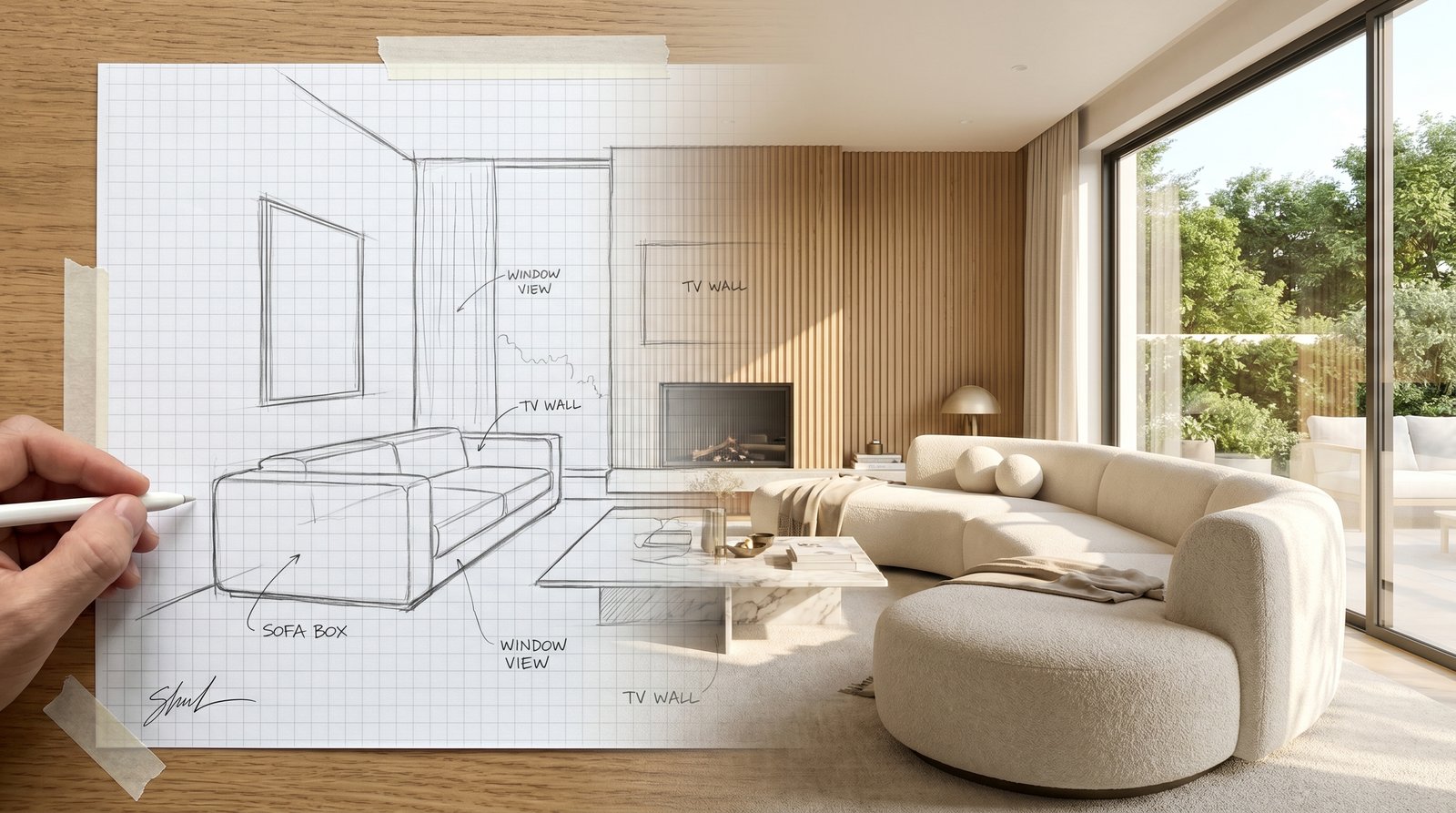
Imagine this: you have a brilliant idea for your living room, a rough sketch on a napkin or in your notebook. Traditionally, turning that raw concept into a lifelike visual would involve expensive designers, complex software, or endless hours of manual rendering. But what if you could bypass all that, and with just a few clicks, see your sketch transformed into a photorealistic room design? This is the magic of ryy.com's powerful Sketch to Render AI technology.
In today's fast-paced world, visualizing interior design concepts has never been easier or more accessible. Whether you're a homeowner dreaming of a renovation, an aspiring designer, or simply someone passionate about home aesthetics, AI tools are revolutionizing the way we approach design. This comprehensive guide will walk you through how to leverage AI to bring your sketches to vibrant life, making your design dreams a tangible reality.
The Evolution of Design: Why AI is a Game-Changer for Your Sketches
For centuries, the design process began with a sketch. From Da Vinci's notebooks to modern architectural blueprints, the humble drawing has been the foundation of innovation. While indispensable, traditional sketching has inherent limitations that AI is now powerfully overcoming.
Beyond Pencil and Paper: The Limitations of Traditional Sketching
A hand-drawn sketch is a fantastic starting point, capturing the essence of an idea. However, its clarity and realism are often subjective and limited by the artist's skill and time. Presenting a rough sketch to others, whether it's a contractor, a family member, or a client, often leaves too much to the imagination. Details like specific textures, lighting conditions, or the exact shade of a paint color are difficult to convey accurately. This can lead to misunderstandings, costly revisions, and a prolonged design process. Furthermore, iterating on a sketch to explore different design options can be incredibly time-consuming, often requiring a completely new drawing for each significant change.
The Power of AI: Bridging the Gap from Concept to Reality
Enter Artificial Intelligence. AI-powered design tools bridge the gap between abstract concept and tangible reality with unprecedented speed and accuracy. An AI interior design platform like ryy.com doesn't just digitize your sketch; it interprets it, understands spatial relationships, and then fills in the blanks with incredible detail, generating multiple photorealistic options based on your input. This capability democratizes high-quality visualization, putting professional-grade rendering power directly into the hands of anyone with an idea and a sketch.
The benefits are manifold:
- Speed: Generate multiple high-quality renders in seconds, not hours or days.
- Realism: See your vision come to life with photorealistic textures, lighting, and materials.
- Experimentation: Easily explore countless design variations, styles, and layouts without redrawing.
- Communication: Present clear, unambiguous visuals that leave no room for misinterpretation.
- Accessibility: No need for advanced CAD skills or expensive software licenses.
How ryy.com's AI Transforms Your Sketch to Render AI Masterpiece
Turning your humble drawing into a stunning photorealistic render with ryy.com is a remarkably intuitive process. Our platform is designed to be user-friendly, guiding you through each step to ensure your vision is captured precisely.
Step 1: Capturing Your Vision – The Perfect Sketch
The journey begins with your sketch. Don't feel pressured to be an artist; the beauty of Sketch to Render AI is its ability to work with even very basic drawings. Focus on:
- Basic Layout: Clearly define walls, windows, doors, and the approximate placement of major furniture items. A simple line drawing is often best.
- Perspective: A single-point or two-point perspective sketch helps the AI understand depth, but even a floor plan can work if combined with good text prompts.
- Clarity: Use clear, dark lines. Avoid excessive shading or unnecessary details that might confuse the AI. You're giving the AI a blueprint, not a finished artwork.
- Room Boundaries: Ensure the sketch clearly defines the interior space you want to design.
You can sketch on paper and then take a clear photo with your phone, or use a digital drawing app. The key is a clean, well-lit image of your sketch.
Step 2: Uploading to Your AI Interior Design Assistant
Once your sketch is ready, head over to ryy.com. Our platform serves as your personal room design tool. The upload process is straightforward:
- Navigate to the "Sketch to Image" or "Interior Design" section.
- Click the "Upload Sketch" button.
- Select your image file (JPEG or PNG are commonly supported).
The AI will quickly analyze your sketch, identifying the core structural elements and spatial arrangements you've laid out.
Step 3: Guiding the AI – Prompts, Styles, and Personalization
This is where you truly become the director of your design. After uploading your sketch, you'll be prompted to provide additional details through text prompts and style selections. This is crucial for guiding the Sketch to Render AI engine to generate results that align with your vision.
- Text Prompts: Describe your desired aesthetic. Be specific! Instead of "nice living room," try "modern minimalist living room with natural light, a grey sectional sofa, oak wood flooring, and a large abstract painting." You can specify colors, materials, furniture styles, lighting moods, and even architectural details.
- Style Selection: ryy.com offers a range of predefined styles (e.g., Scandinavian, Industrial, Boho, Contemporary, Classic). Choosing one helps the AI understand the overall mood and aesthetic you're aiming for.
- Material & Color Palettes: Some advanced features might allow you to select specific material types (e.g., marble, velvet, exposed brick) or color schemes, further refining the AI's output.
The more descriptive and precise you are, the better the AI can interpret your intent and generate highly relevant designs.
Step 4: Iteration and Refinement – Polishing Your Photorealistic Room Design
The first set of renders you receive might be fantastic, or they might serve as a starting point for refinement. ryy.com's AI will generate several variations based on your initial input. Review these carefully:
- Compare Options: Look at how different prompts or styles have influenced the outcome.
- Identify Strengths & Weaknesses: Which elements do you love? What needs adjustment?
- Refine Prompts: If the results aren't quite right, adjust your text prompts. Add more detail, remove conflicting descriptions, or try different keywords. For instance, if the furniture isn't quite right, try specifying "mid-century modern armchair" instead of just "armchair."
- Experiment: Don't be afraid to try different style presets or even slightly altered sketches to see how the AI responds. This iterative process is a core strength of using an AI interior design tool.
With each iteration, you'll guide the AI closer and closer to your ideal photorealistic room design.
Practical Applications and Real-World Examples
The applications of turning a sketch into a photorealistic render are vast, benefiting various groups of users.
Homeowners: Visualizing Renovations and Redecorations
For homeowners, the ability to visualize changes before committing to expensive purchases or renovations is invaluable.
- Kitchen Remodel: Sketch out a new kitchen layout – where the island goes, placement of appliances. Use ryy.com to see it with sleek quartz countertops, modern cabinetry, and recessed lighting.
- Living Room Refresh: Draw your current living room with new furniture placements. Experiment with different sofa styles, rug patterns, and wall colors, seeing the result instantly.
- Bathroom Renovation: Imagine a spa-like bathroom. Sketch the new tub, vanity, and shower, then let the AI render it with marble tiles, soft ambient lighting, and lush plants.
This empowers homeowners to make confident decisions, ensuring the final outcome truly matches their dream.
Designers: Streamlining Client Presentations and Iterations
Professional interior designers can significantly boost their efficiency and client satisfaction.
- Quick Mockups: Rapidly generate multiple design concepts from initial client sketches or floor plans, speeding up the ideation phase.
- Enhanced Presentations: Present clients with vivid, photorealistic renders that help them fully grasp the proposed design, minimizing abstract interpretations.
- Faster Revisions: Client feedback can be incorporated almost instantly by tweaking prompts or uploading slightly modified sketches, dramatically reducing turnaround times for design iterations.
An AI interior design platform becomes a powerful extension of a designer's toolkit, allowing them to focus more on creative problem-solving and less on tedious rendering tasks.
DIY Enthusiasts: Experimenting with Layouts and Aesthetics
For the growing community of DIY enthusiasts, this tool is a playground for creativity.
- Furniture Placement: Experiment with different furniture arrangements in a room before moving heavy items.
- Color Schemes: Test various wall colors, upholstery fabrics, and accent hues to find the perfect palette.
- Budget-Friendly Visualization: Plan ambitious projects without the upfront cost of physical materials, ensuring the desired look is achievable within budget.
ryy.com serves as a virtual laboratory where any design idea can be tested and perfected, making your DIY projects more successful and satisfying.
Pro Tips for Achieving Stunning AI Renders from Your Sketches
While the process is intuitive, a few expert tips can elevate your Sketch to Render AI results from good to absolutely breathtaking:
- Start Simple, Add Detail Iteratively: Don't try to cram too much information into your initial sketch or prompt. Begin with basic structural elements and overall style. Once you have a good foundational render, use subsequent prompts to add specific furniture, textures, lighting, and decorative elements.
- Leverage Text Prompts Wisely: Be descriptive, use keywords, and define the mood. Specify materials (e.g., "polished concrete floor," "velvet sofa"), colors ("deep emerald green walls"), and lighting ("warm ambient lighting," "natural sunlight streaming through"). Think like you're describing the scene to a human designer.
- Experiment with AI Styles: Don't stick to just one style preset. Try different options available on ryy.com (e.g., "Modern Minimalist," "Bohemian Chic," "Industrial Loft") to see how the AI interprets your sketch through various aesthetic lenses. You might discover an unexpected look you love.
- Understand AI Limitations (for now): While incredibly powerful, AI is a tool. It might occasionally misinterpret complex geometries or artistic nuances in very abstract sketches. If a render isn't quite right, simplify your sketch, refine your prompt, or try from a slightly different angle.
- Use Good Quality Input Sketches: A clear, well-lit, and reasonably clean sketch will always yield better results. Avoid blurry photos, heavy shadows, or messy lines in your input image, as these can confuse the AI.
Conclusion: Your Design Future is Photorealistic
The ability to transform a simple sketch into a stunning, photorealistic room design is no longer confined to professional studios with expensive software. With accessible and powerful platforms like ryy.com, anyone can now harness the magic of Sketch to Render AI. This technology empowers you to visualize your wildest design dreams, experiment with confidence, and make informed decisions, whether you're planning a major renovation or just redecorating a corner of your home.
Gone are the days of uncertainty and guesswork. Embrace the future of interior design. Take your ideas from paper to pixel perfection and truly see your space before it's even begun. Ready to turn your imagination into reality? Head over to ryy.com today and experience our free AI design tools to transform your sketches into your dream rooms!